
The 7 Best Language Reactor Alternatives for Netflix (2026)
Language Reactor is a great dual-subtitle tool — but it isn't the only one, and it isn't the best fit for everyone. If you want AI explanations, spaced repetition, a mobile app or a simpler study loop, here are the seven best alternatives for learning a language on Netflix in 2026.

Language Reactor (formerly Language Learning with Netflix) popularised dual subtitles and instant dictionary lookups in the browser. It's fast and free — but people look for alternatives for good reasons: they want explanations in context rather than a dictionary entry, built-in review or quizzes, a cleaner interface, or support for platforms beyond Netflix and YouTube. Below we compare the best options, then help you pick.
Quick comparison
| Tool | Best for | Dual subtitles | In-context AI explanations | Review / quizzes | Free to start |
|---|---|---|---|---|---|
| Streal | A guided study loop on Netflix | Yes | Yes | Quiz + PDF recap | Yes |
| Language Reactor | Fast dictionary lookups | Yes | Dictionary-focused | Saved items | Yes |
| Migaku | Anki power users | Yes | Varies | SRS (core) | Trial |
| FluentAI | AI-assisted watching | Yes | Yes | Varies | Varies |
| Trancy | Multi-platform subtitles | Yes | Varies | Varies | Freemium |
| Lingopie | A built-in show library | Yes | Click-to-translate | Flashcards | Trial |
| eJOY / Chrome dictionaries | Lightweight lookups | Varies | No | Flashcards | Yes |
Competitor features and pricing change often — check each product's site for the latest. This table reflects how these tools are positioned for Netflix learners, not an exhaustive audit.
The 7 best Language Reactor alternatives
1. Streal — best for a guided study loop on Netflix
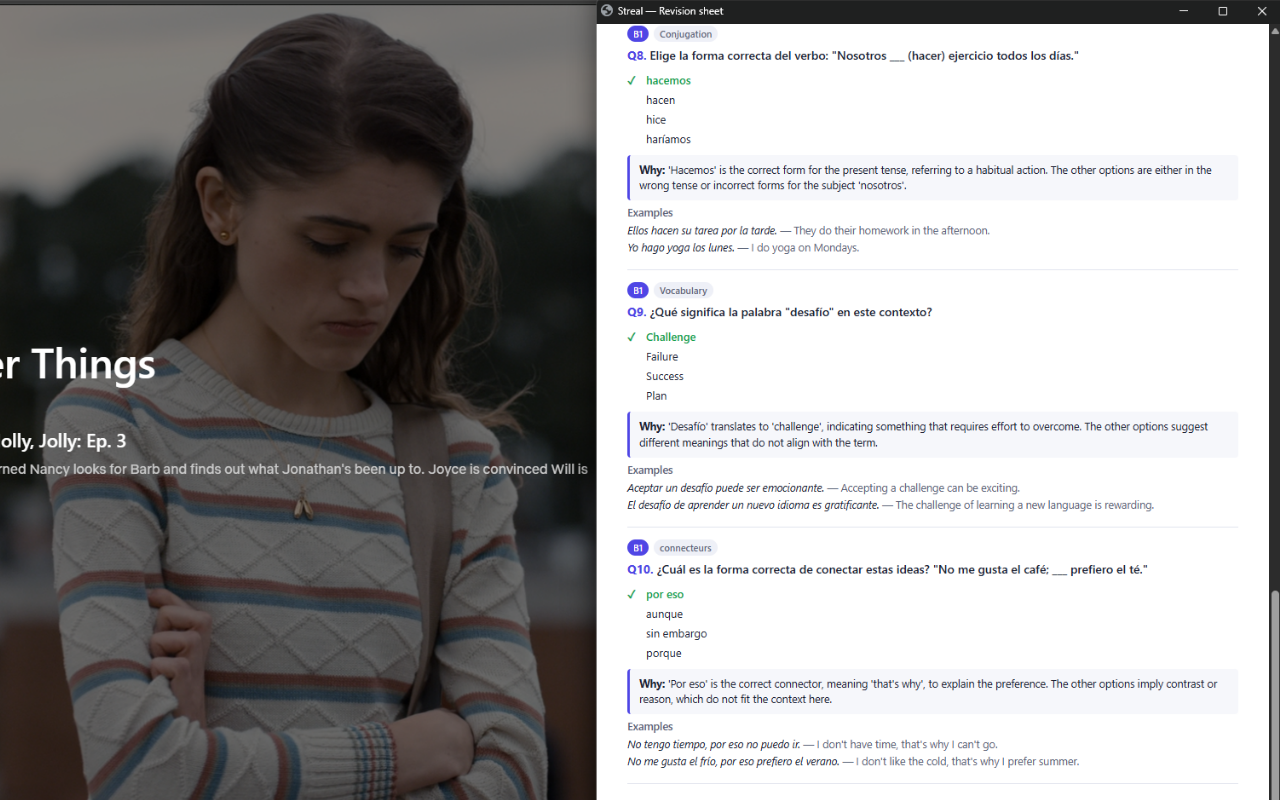
Streal is Netflix-first and built around one simple loop: read with dual subtitles, click any word for an explanation in its sentence (with the grammar rule), and finish each episode with a quiz made from its own dialogue. Where Language Reactor gives you a dictionary entry, Streal explains the word the way it's used in that scene, saves it with the exact moment, and helps you review it — no flashcard management required. It's the best pick if you want to actually learn from what you watch, not just look words up.
2. Language Reactor — best for fast dictionary lookups
Still an excellent, free way to add dual subtitles and instant lookups on Netflix and YouTube. If all you want is quick translations while you watch, it does that well. The trade-off is that it's dictionary-centric — it shows you meanings, but leaves the reviewing and remembering entirely up to you.
3. Migaku — best for Anki power users
A powerful toolkit for learners who live in spaced repetition. Migaku turns media into rich Anki flashcards with audio and screenshots. If you love building and drilling decks, it's superb — but the setup is more hands-on and rewards people who already know their way around Anki.
4. FluentAI — best for AI-assisted watching
An AI-first take on learning from subtitles, layering explanations onto what you watch. Worth a look if you want AI to break down sentences for you, though the experience varies by language and platform.
5. Trancy — best for multiple platforms
Trancy brings dual subtitles and click-to-translate to Netflix, YouTube and other sites. A good choice if you watch across many platforms and want one consistent subtitle overlay everywhere.
6. Lingopie — best for a ready-made library
Lingopie isn't an overlay on Netflix — it's its own streaming service with licensed shows, click-to-translate subtitles and built-in flashcards. Great if you'd rather have a curated library organised by level, though the catalogue is smaller than Netflix's.
7. eJOY & lightweight dictionary extensions — best for simple lookups
A category of small, free extensions that add click-to-translate and a flashcard list. Handy and unobtrusive, but they stop at the lookup — there's no in-context explanation or episode-based review.
How to choose
- You want to actually remember what you watch: choose Streal — explanations in context plus a quiz on each episode.
- You just want fast lookups: Language Reactor or a lightweight dictionary extension.
- You're an Anki devotee: Migaku.
- You want AI to explain sentences: FluentAI or Streal.
- You watch across many sites: Trancy.
- You want a curated library instead of Netflix: Lingopie.
Why learners switch to Streal
Click a word and see what it means inside the sentence — the nuance and the grammar behind it — so you can reuse it, not just recognise it. Every saved word keeps its sentence and the exact scene.

Review that actually happens
At the end of each episode, a quiz built from its own dialogue turns passive watching into real review — with a PDF recap to keep. No decks to build, no cards to manage.
Try the simplest Netflix learning loop
Free to start, one click to install, and it runs right on top of Netflix.
Add to Chrome — freeRelated reading
New to the method? Start with how to learn a language with Netflix. If a dictionary extension has not moved you as much as you hoped, the reason is usually one of three things covered in why you still cannot understand native speakers, and the vocabulary arithmetic behind it is in how many words you need to watch without subtitles.
FAQ
What is the best Language Reactor alternative?
For fast lookups, most dual-subtitle tools are comparable. If you want a guided learning loop on Netflix — explanations in context, scene-based vocabulary and quizzes — Streal is built for exactly that.
Is there a free Language Reactor alternative?
Yes. Streal is free to start, as are Language Reactor and several lightweight dictionary extensions. Premium plans typically add unlimited saved words and review.
Does Streal work on Netflix?
Yes, in a desktop browser today. Prime Video and Disney+ are coming soon.
Language Reactor or Migaku?
Language Reactor for quick lookups; Migaku if you want to build and drill Anki decks. If you'd rather learn directly from each episode without managing flashcards, try Streal.
Streal vs FluentAI vs Language Reactor vs Migaku: which one?
They solve different problems. Language Reactor and lightweight dictionary extensions are lookup tools. Migaku is a flashcard pipeline. FluentAI adds AI explanation on top of watching. Streal is the only one of the four built around an ordered course, 32 chapters from A1 to C2, with the catalogue used as its example bank rather than as the lesson itself. Pick the lookup tools if you are already comfortable in the language, and the course if you are not.