A full language course. Taught through the shows you already watch.
32 chapters from A1 to C2, with real lessons, quizzes and a test at the end of every chapter. And every rule you learn comes back as a line someone actually says on Netflix, with the timecode. One click opens the film at that second.
Streal runs on a computer. It's a Chrome extension, so it can't be installed from a phone. Leave your email and we'll send you the link for later.
Chapter 1 of A1 is free in full: six lessons, their quizzes and the chapter test. Works on Netflix, on a computer.
You've tried both halves. Neither one works alone.
If one of these is you, you already know the problem isn't effort.
The app
Two years of daily lessons and a streak you're proud of. Then you open an episode in the language you've been studying and understand one sentence in five.
The show
You switch the subtitles to the target language, hold on for ten minutes, understand a third of it, and quietly switch back to your own. Nothing sticks, because nothing was ordered.
The dictionary extensions
They translate whatever word you click. Useful once you're already comfortable. From zero, you're being handed a dictionary and wished luck.
What was missing was never more vocabulary. It was an order to learn it in, and real speech to meet it in.
Learn it, meet it, then let the film revise it
The course teaches. The film is where it becomes real.
Learn
A real lesson, in the right order
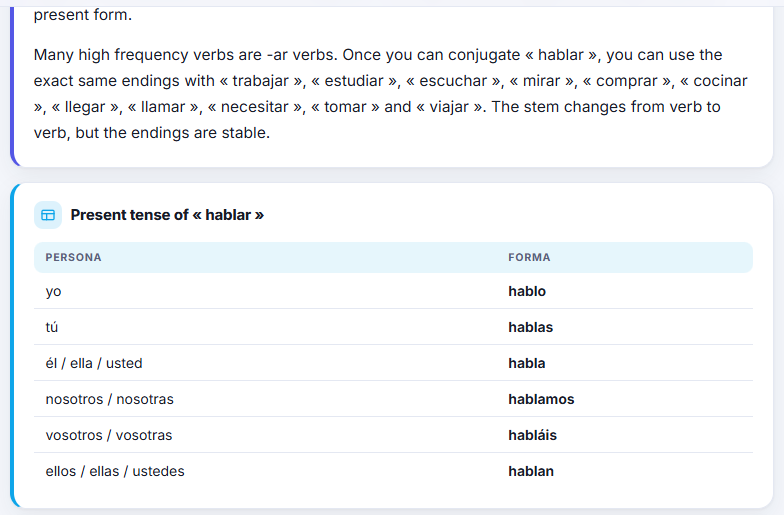
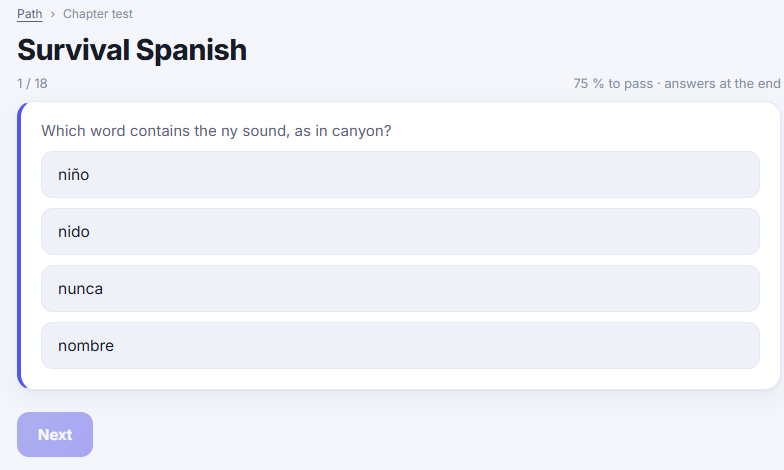
An explanation you can actually follow, tables, examples, the mistakes everyone makes, and a quiz at the end. Around nine minutes. Then the next one, which builds on it.
Meet it for real
Every lesson ends in the catalogue
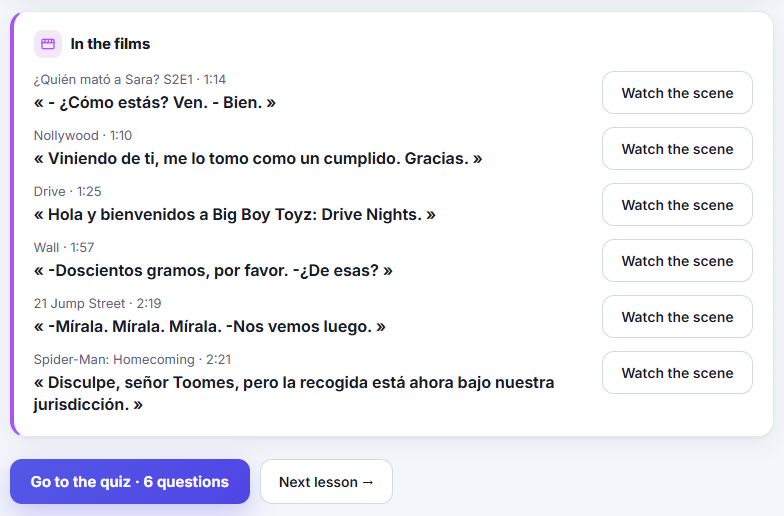
Under the rule: the actual lines that use it, with the title and the timecode. Click one and Netflix opens at that second. Not an invented textbook sentence, but something a real person says in a show you might already have watched.
The film revises
Then watching becomes revision
While you watch, Streal knows what your course has already taught you and points out those notions in the dialogue as they pass. If you're a beginner, it won't drop a brand-new grammar point on you mid-scene: it sends you back to the lesson instead.
What's actually in there
No reviews to show you yet. So here is the thing itself, counted.
A1 to C2, in order, each one ending on a chapter test
per language, around nine minutes each, every one with its own quiz
English, French and Spanish. All three complete, all three included
real catalogue dialogue mapped to the notions it contains, each with its timecode
films and series indexed line by line, and the list keeps growing
Counted on 11 September 2026. Dual subtitles and click-to-translate work on any title that offers subtitles in the language you're learning.
Three things a dictionary can't do
Everything else on this page follows from these.
An ordered path
Lessons in sequence with quizzes and chapter tests, from your very first word to C2. You never have to decide what to learn next.
The catalogue as your example bank
Every notion comes with the real lines that contain it, and a click that opens the film at that exact second.
Subtitles that teach while you watch
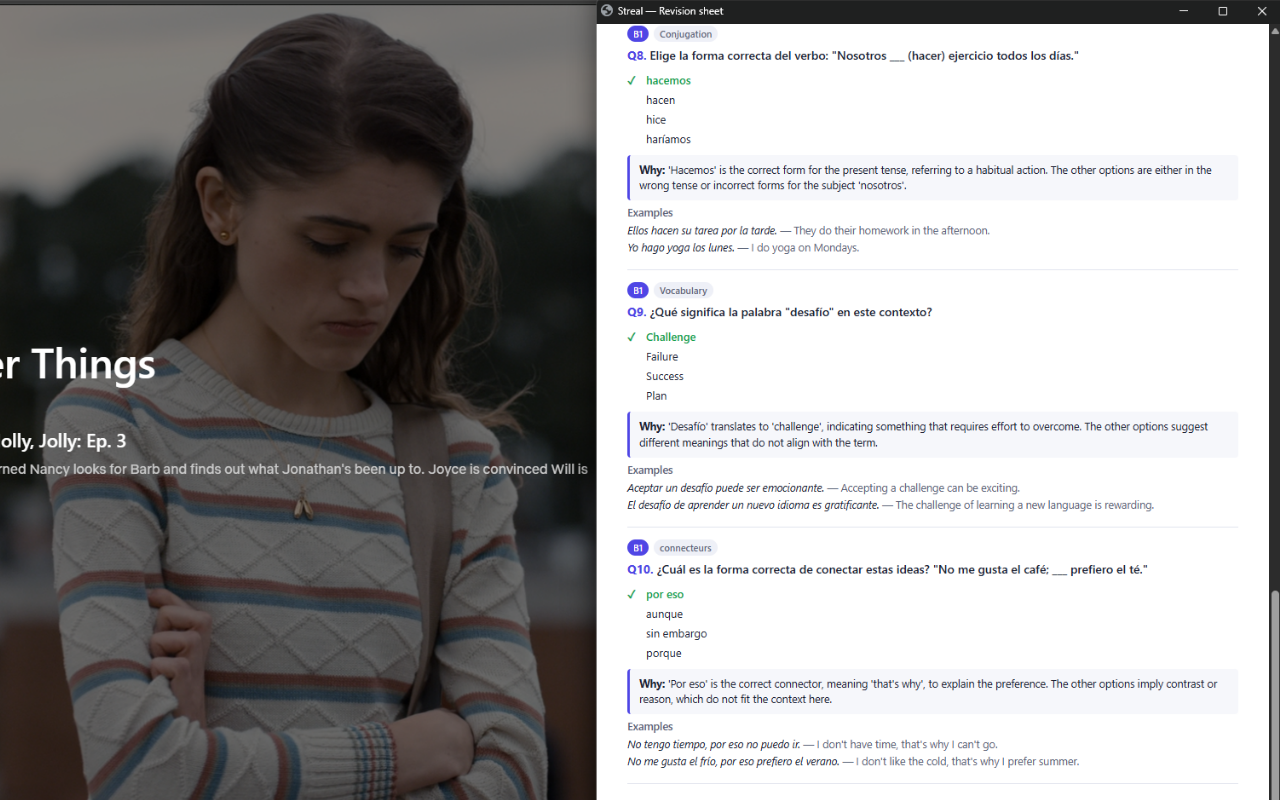
Two languages at once, click any word for its meaning inside the sentence, and an end-of-film review of what you actually understood.
- A downloadable PDF sheet for every film and series
- Jump back to the exact second any word was spoken
- Vocabulary saved with its sentence, its translation and its scene
- Levels and ranks fed by lessons, tests and films alike
- Sign in and everything follows you to another computer
- A ready-made mini-course for each indexed film, free for everyone
Both languages on screen, while it plays
The line you are hearing and its translation, together, continuously. Click any word and you get its meaning inside that sentence, saved with the second it was spoken.
A PDF sheet for every film and series
When you finish watching, download a ready-to-review sheet with all the words you saved, their translations and the sentences they came from. Perfect to revise offline or print.
Why not just use a free dictionary extension?
You can, and if you're already comfortable in the language it may be all you need. Here's the honest difference.
| Dictionary extensions | Streal | |
|---|---|---|
| Translate a word you click | Yes | Yes |
| Dual subtitles | Yes | Yes |
| An ordered path from zero | No | 32 chapters, A1 to C2 |
| Quizzes and chapter tests | No | Yes |
| Rules linked to real film lines | No | 5,600+, with timecodes |
| Knows what you've already learned | No | Yes, and adapts what it shows you |
Chapter 1 is free, whole. Then you decide.
Not a demo and not a teaser: six lessons, their quizzes and the chapter test. Enough to know whether this teaches you anything before you spend a cent.
Free
- Chapter 1 of A1, in full: six lessons, their quizzes and the chapter test
- One real film line per notion
- Click any word on Netflix for its meaning in context
- A mini-course for each indexed film
- 10 saved words and 2 end-of-film reviews per month
Premium
- All 32 chapters, A1 to C2, quizzes and tests included
- Every film line for every notion, not just one
- Dual subtitles while you watch
- Unlimited saved words and end-of-film reviews
- All three languages, at no extra cost
Install the extension and sign in, and your trial starts in one click.
Streal installs on a computer. We'll email you the link.
A card is required to start the trial. Cancel in one click from the extension at any point during those 14 days. You're charged only if you're still here on day 15.
Frequently asked questions
Will this work if I'm a complete beginner?
That's who the path is built for. Chapter 1 starts at the sounds of the language, before any grammar. And while you watch, Streal deliberately holds back notions you haven't met yet instead of dropping them on you mid-scene.
Do I need to already watch a lot of Netflix?
No. The course works on its own, and you can follow a whole chapter without opening a single film. The catalogue is what makes the examples real, not a requirement.
Does it work with any show?
Dual subtitles and click-to-translate work on any title that offers subtitles in the language you're learning. The film lines inside lessons come from over 400 indexed titles, and that list keeps growing.
Why a Chrome extension and not an app?
Because it works inside Netflix itself, on the page. That means a computer with Chrome. There's no phone version, and we'd rather say so here than let you find out after paying.
Which languages can I learn?
English, French and Spanish, all three complete from A1 to C2. Your own interface language can be any of the three.
Do I need an account?
Not to try it. An account (Google sign-in) syncs your lessons, vocabulary and progress across your devices.
Do you store Netflix videos?
Never. Streal only works with the text of the subtitles shown on screen. No video is stored or redistributed.
How does the free trial work, exactly?
14 days of Premium, for members who have never subscribed before. A card is required to start. Cancel in one click from the extension at any point during those 14 days and you are not charged.
Which platforms besides Netflix?
Netflix only for now. Other platforms are on the list, without a date.
Chapter 1 costs nothing and takes about forty-five minutes.
Six lessons, their quizzes and the chapter test. At the end you'll know whether this works for you, which is more than any sales page can tell you.
Start chapter 1, free